

Develop.
If we continue using the metaphor of the explorers, discovery and museums, then the Development phase is the time the people used the spoils of their travels, the rocks, gems, plants, artefacts and stuffed exotic animals as inspiration on which to visualise new and innovative ideas. For example, the great French artist Pablo Picasso is famous for painting strange-looking faces. He was applauded for his originality and creativity. In fact, he was a keen collector of wooden African tribal masks, found during French colonial expeditions abroad. Picasso was not interested in their function in African culture, he admired their form and used them as a structure for a completely new way to see, and consequently depict the human face. Picasso used African masks to help him invent Cubism.
Students use inspiration and influences from the Discover phase and data and information from the Define phase to generate and visualise ideas that stem from their design problem. They explore different ways to use the elements and principles of design in design ideas and their constituent parts and test ranges of methods, media and materials in functional, aesthetic and expressive ways.

Takeaways

Good to go
Develop
The VCD development phase is where students generate and visualise as many different design ideas as possible using rapid sketching and creative thinking techniques. Students then explore design elements, principles, and various methods and materials to refine and elaborate on their best concepts.
- Quantity Leads to Quality
The goal is to create the widest range of ideas possible through rapid visualisation and low-fidelity prototypes. Starting with one hundred ideas and refining them down to the final solution creates a much stronger outcome than beginning with only five ideas. - Creative Thinking Breaks Mental Blocks
When ideas start to run dry or become repetitive, creative thinking techniques like SCAMPER and forced associations help designers overcome assumptions and discover unexpected solutions. These structured ‘games’ push thinking in new directions and prevent creative stagnation. - Design Elements and Principles Shape Visual Impact
Deliberately experimenting with colour, shape, line, texture, balance, contrast, and other design fundamentals transforms basic sketches into powerful visual communication. Each element and principle elicits distinct emotional responses and conveys specific messages to the audience. - Methods, Materials, and Media Create Unique Effects
Exploring both manual techniques (drawing, painting, printmaking) and digital tools (vector graphics, CAD programs, 3D printing) reveals unexpected possibilities and textures. The combination of different approaches often produces the most innovative and engaging design solutions.
Introduction
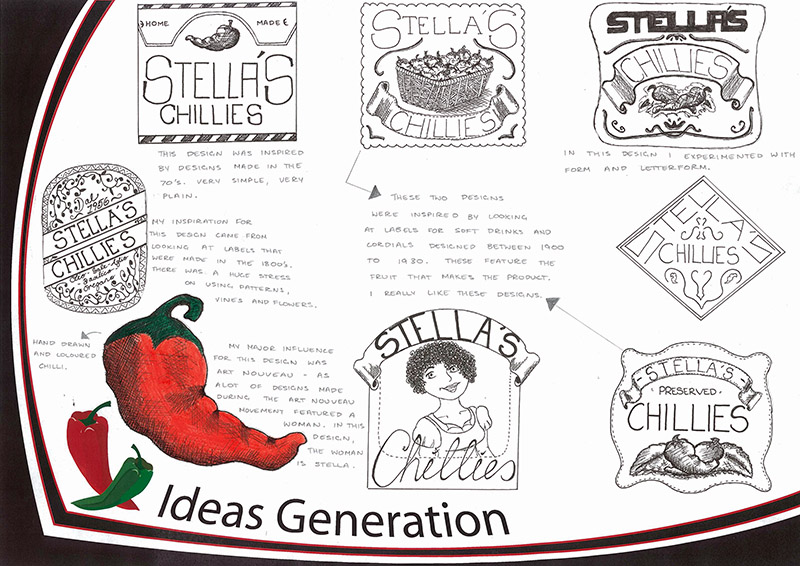
The Development phase of the Double Diamond design process is a stage where students make their ideas visible. They use rapid visualisation drawings, sketching freely or perhaps generating low-fi prototypes to give their ideas form. The aim is to suggest as many ways as possible that might solve the design problem described in a Brief. Following an initial stage of ‘ideation’, students may find that the flow of ideas begins to stop. At this stage, they call on a range of Creative Thinking strategies that enable them to challenge their assumptions and renew, by synthesising ideas in unexpected ways.
Students are then encouraged to elaborate and drill deeper into the aesthetic qualities and the ways they function by deliberately selecting and exploring Design Elements and Principles and different manual and digital methods, media and materials.
Students document their design journey by describing and evaluating the decisions they have made and explaining links between their ideas and research and inspiration.
Steps used in the Develop phase include:
- use any form of brainstorming and mind-mapping methods using both words and images to develop and synthesise concepts found in the inspiration
- use rapid visualisation drawing and making methods to create, recreate, elaborate and extend visual ideas relevant to the communication need
- select and use appropriate creative thinking routines to enable them to overcome assumptions and synthesise ideas in new and unexpected ways
- select and apply design elements and principles in deliberate studies and evaluate their effects
- select and apply manual and digital methods, media and materials in deliberate studies and evaluate their effects
- annotate ideas, evaluate ideas, describe the design decisions and make links between ideas and research material using appropriate design language
- work collaboratively including using presenting ideas in design critiques and focus groups that elicit fresh perspectives and possibilities of new ideas and approaches to satisfying a communication need
- iteration is an essential component of the Develop phase. Students necessarily work in circles as they visit research information, generate ideas, test and evaluate them and return again to rejuvenate and refocus innovation
The Development phase uses Divergent Thinking.
Jump to
Rapid visualisation
No matter how creative a designer is, sooner or later their ideas will begin to dry up or become repetitive. Research has shown that in order for designers to break through 'creative block' they need to change things up a bit. Creative Thinking routines are like games that contain rules to enable designers to work fresh and see new opportunities.
Line drawings, Low-Fi prototypes
The first aim of this phase is for students to accumulate the widest range of ideas. This means generating the largest number of drawings possible. Thinking forward for a moment; the further we go into the Design Process; our thinking once again becomes convergent. This means that with the use of Critical and Reflective Thinking to select preferred ideas, the number of ideas we have will necessarily be cut. My point is, if we start with 100 initial ideas, that are cut and combined to 50, then to 40 leading to 30, 20, 10 then right down to the last, that folio will be ever so much stronger folio than one that begins with just 5 ideas, that cut to 3, then 2, and finally the last. Quite simply, you need as many different usable ideas as you can get as early as you can.
The second aim is to provide the widest range of approaches you can find that could satisfy the communication need. As students visualise ideas in the Development phase, they will notice that some different ideas seem to share similarities. This could be in their form, the number of components they have, the materials they are made from, the style they follow or how they function. Later, students will group them together; moving beyond a random collection of ideas and creating a range of viable concepts.
Freehand sketching or low-fi prototyping is the best way to visualise ideas. Students should be encouraged just to use line or cheap and easy-to-work-with materials to visualise ideas in the easiest, most time-effective ways.
Students should use any drawing methods they feel are comfortable. They should be free to jump from two to three dimensions, drawing complete designs or just parts of them.
Remember, the key to working with Divergent Thinking successfully is to suspend judgement, overcome assumptions and free your students’ minds.
Maximising the benefits of research
VISUALISING IDEAS
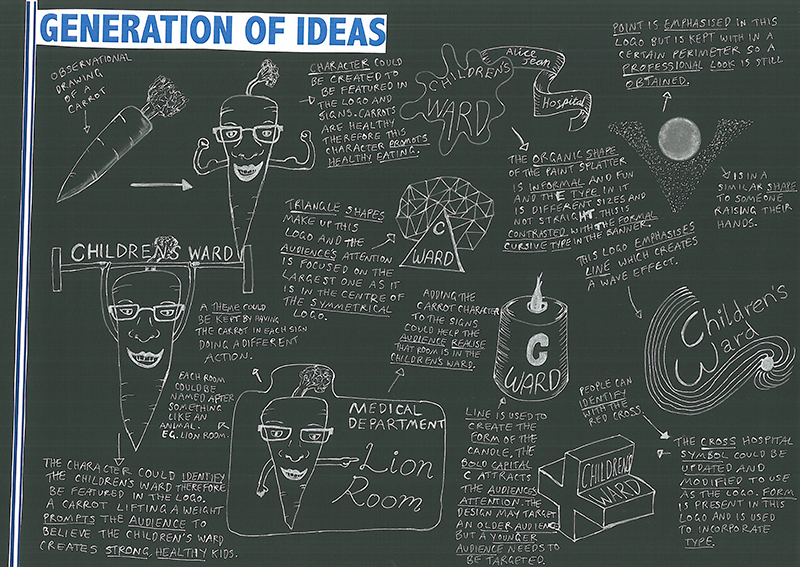
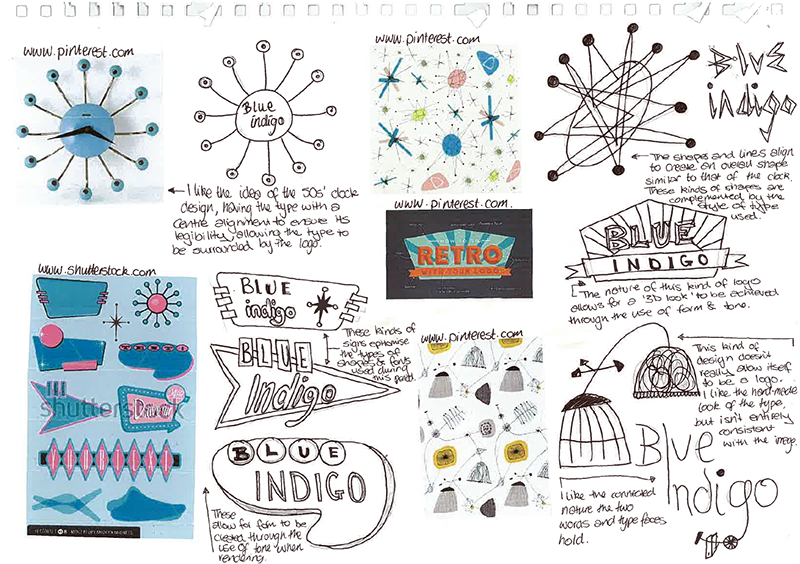
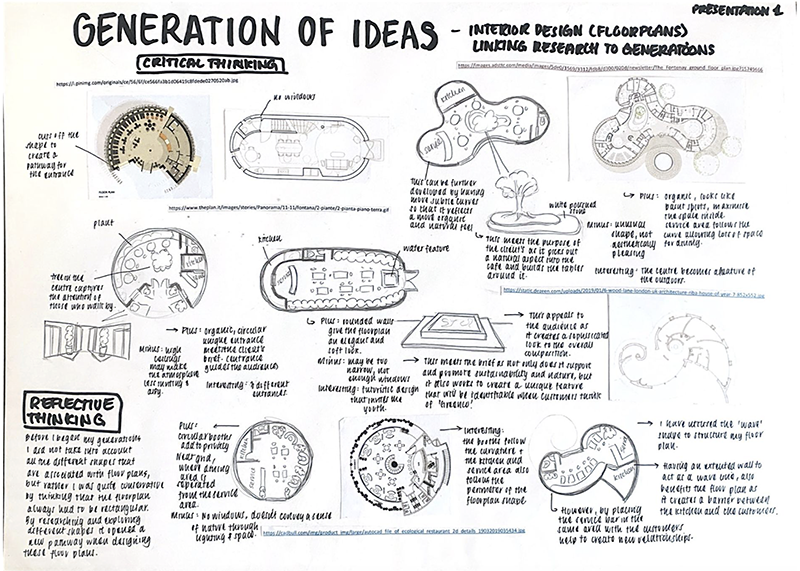
task

Show I know ...
1.1 VISUALISATION DRAWINGS
Jump to
Extend ideas
There are more than a thousand ways to solve a problem. In VCD each 'way' is considered an 'idea'. However, a thought only becomes an idea when it has form and is tangible. One idea leads to another, then another and hopefully like a chain reaction, design problems are deconstructed and expanded with students considering every possible way to satisfy a communication need.
Finding new ways
This section and the strategies on the Divergent Thinking page explore ways to re-energise divergent thinking and ease out all of the opportunities enabling students to satisfy communication needs in unexpected ways.
Staying true to the brief
Students might find that with all this creativity, their ideas begin to stray away from the constraints in the Brief. To prevent this from happening, students are encouraged to revisit the Brief frequently. They should pay particular attention to the purpose, context, constraints and expectations. Students should use annotations to identify, describe and discuss features of their drawings relevant to the specifications in the Brief and pinpoint those that are not and will not be taken forward. Annotations should also suggest ways designs can be brought closer to satisfying communication needs.
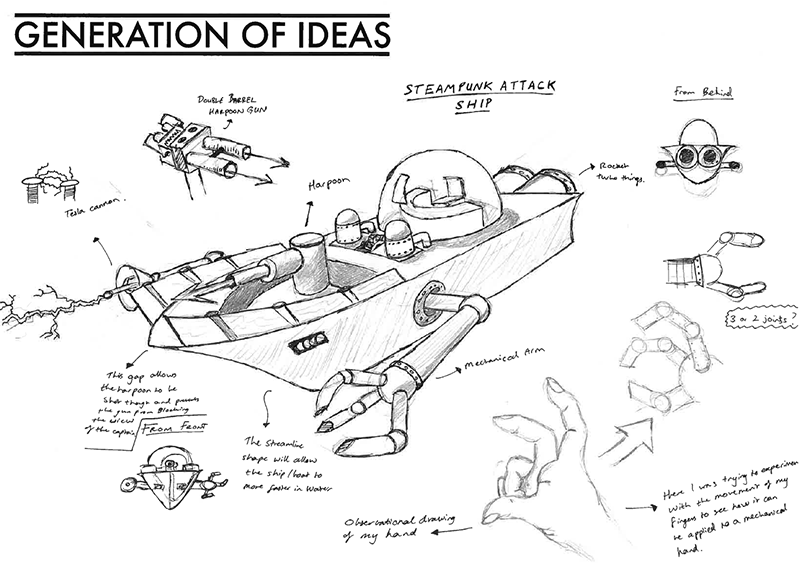
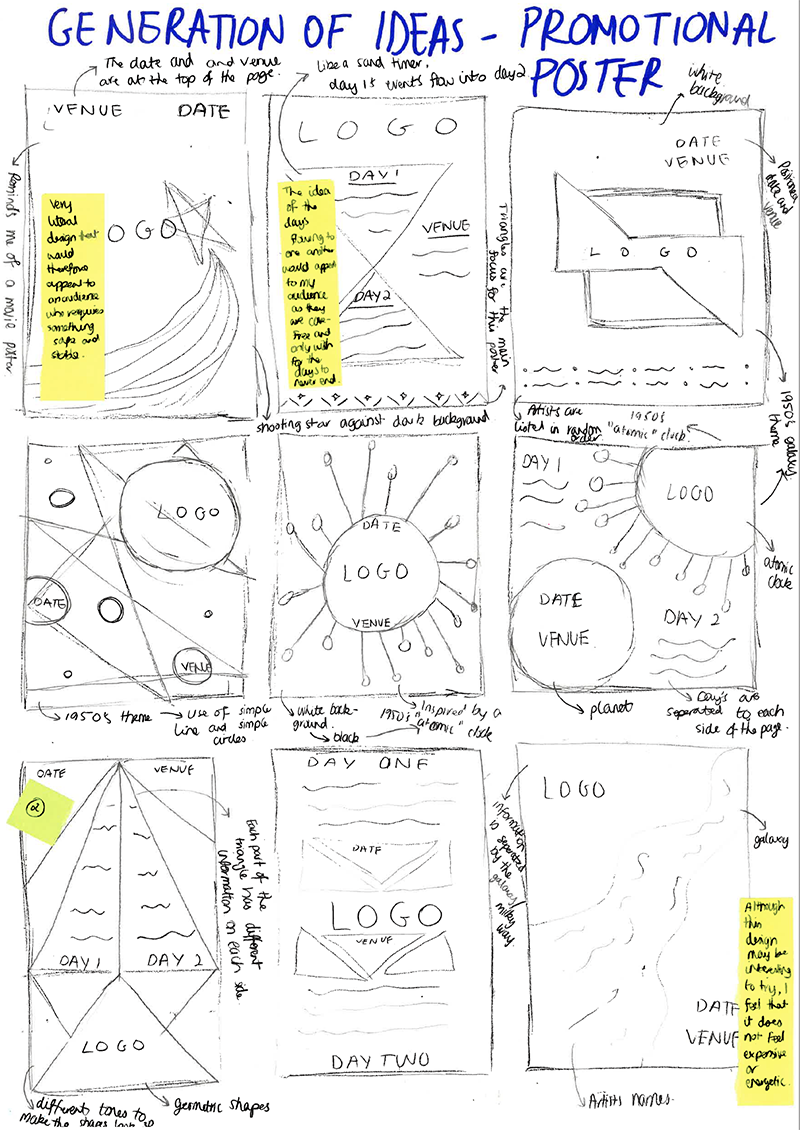
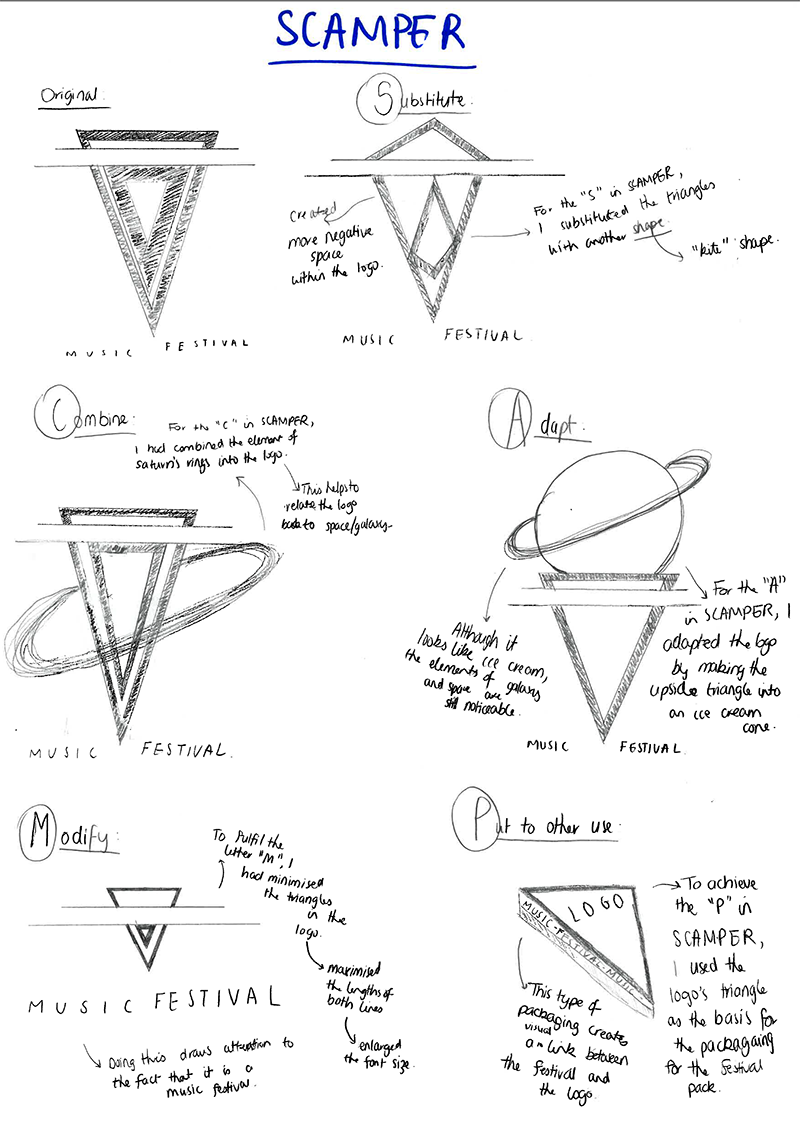
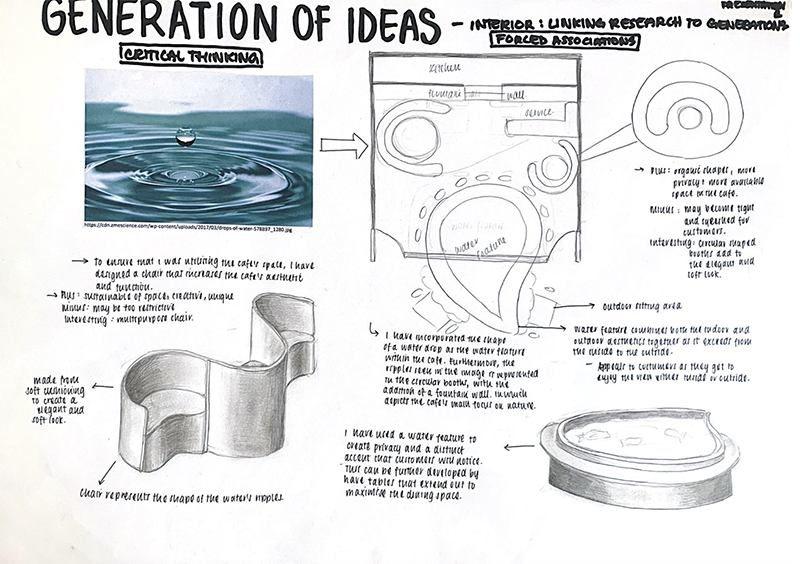
Below are some examples of student work that demonstrates a broadening of approaches using creative Thinking routines. Explanations of these techniques are shown on the page on Divergent Thinking.
BROADENING IDEAS
Jump to
 (opens in a new tab)
Divergent Thinking Strategies
task
Show I know ...
2.1 RENEWING IDEAS AND BROADENING APPROACHES
2.2 Reflective Thinking and Annotations
Scroll ahead to the section on Annotations (below). Use the prompts in the Annotations section to guide the evaluation of your ideas.
Jump to
Explore design elements and principles
The next step in the Development phase is for students to develop the ways their designs convey ideas and information using Visual Language. They will explore the aesthetic qualities, compositions and layouts of their designs by experimenting with the individual characteristics of Design Elements and then, how they function together by creating relationships using the Design in separate deliberate studies.
Jump to
 (opens in a new tab)
Design Elements
 (opens in a new tab)
Design Principles
DEVELOPMENT Using Design ELEMENTS AND PRINCIPLES with manual methods
The Design Elements and Principles are key contributors to Visual Language. Their use, in different ways, leads to different ideas or emotions being conveyed to audiences and users. As students have worked predominantly in line, to this point, it is from here that they bring their designs alive with the full range of visual effects. Students should approach this section in an open-minded way, dismissing assumptions about how the design elements and principles should be used, and launch themselves into a wholeheartedly divergent approach with abundant experimentation. We will begin our experimentation with Design Elements and Principles by using manual methods.
When the use of some Design Elements in design ideas is intuitive and others, are not so, students should aim to incorporate the complete group in deliberate trials. Further into this section, students will find a table full of suggestions on how to use Design Elements and Principles in two and three-dimensional design ideas.
To begin, trials can be made so that individual Design Elements and Principles are emphasized. For example, ideas could be drawn using line, shape, tone or texture exclusively. Add to that, variations in contrast, figure-ground, symmetrical and asymmetrical balance accordingly to best suit the purpose and context described in the design problem.
Development of ideas with Design Elements and Principles in the fields of environments and object design may involve significant changes to initial ideas to emphasise elements such as line, shape, colour and texture and principles such as balance, contrast, scale, proportion and pattern. Much can be achieved with variations to the composition of objects through experiments using the Design Elements and Principles as long as students are prepared to modify the form as well as the surface of design ideas.
The development of ideas is also done with real three-dimensional studies. Students make models and low-fi prototypes to explore form, ergonomics and function.
DEVELOPMENT Using Design ELEMENTS AND PRINCIPLES
Students could consider working with digital processes using both raster and vector-based digital applications. Suggestions include; changing the arrangement, size, scale and proportion and features of images and layouts.
Check out this video by a great Vis Comm teacher, Damien Lees. He takes us through the steps of developing ideas with each of the Design Elements using Adobe Illustrator.
Design ideas in the fields of environments and object design can be developed with using digital media. Students may develop ideas in the virtual space using CAD applications where they develop both the form and the surface. They can also rapid digital prototype by 3D printing or laser cutting forms.
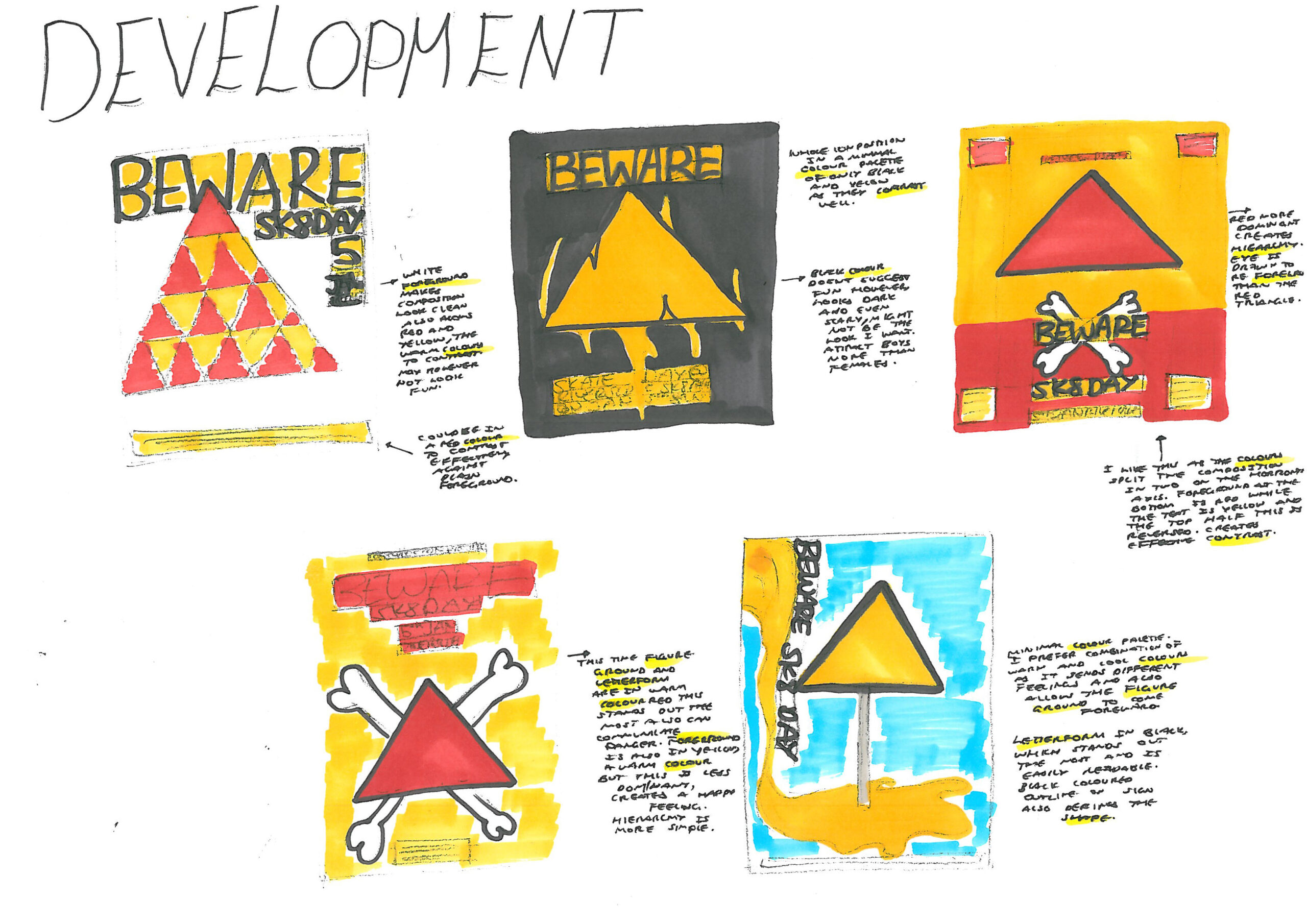
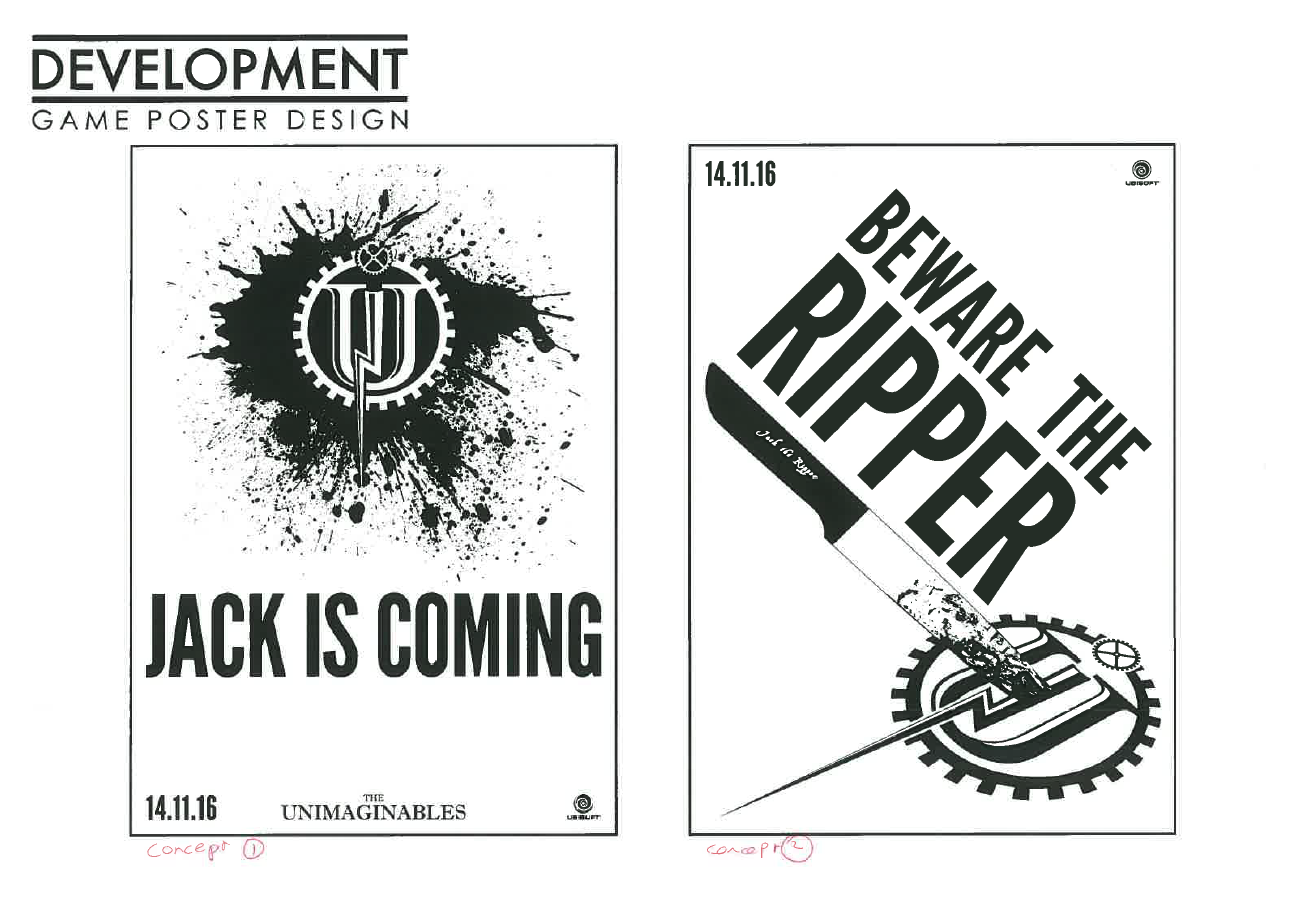
Intentional Ways to explore Design Elements and Principles
Design Elements
TWO-DIMENSIONAL IDEAS
THREE-DIMENSIONAL IDEAS
Colour
- Draw the design from single colour
- Use colour schemes like harmonious, triadic
- Use colour schemes from different eras like 1950s pastel colour schemes
- Use colour schemes based on external sources like the beach
- Use complimentary colours
- Explore how different colours interact with form
- Break up the form with different colour
Shape
- Design a layout using rectilinear grids
- Design with organic layouts
- Colour in shape areas
- Reshape images or photos
- Redesign components using geometric or organic shapes
Line
- Use outlines, remove outlines
- Use alignment lines
- Vary the aesthetic qualities of your lines - rough, smooth
- Add real lines to forms like sticks
Tone
- Convert your work to greyscale
- Render with harsh tones to enhance form
- Render softly for sensitive effects
- Create tone from other elements like point, line or type
- Create forms that have sharp edges or soft flowing forms that create even tones of light and shade
Texture
- Use elements line and point to create different textures on shapes
- Enhance the surface of your design with different textures
- Add different materials to your model
Form
- Make angled shapes that imply form
- Create form from different elements like shape, line, colour
- Manipulate for with colour, tone or texture
- Create depth in 2D layouts with coloured backgrounds
- Think of your model as volume and void
- Cut a hole in a form
- Use negative forms
Point
- Use dot points in your design
- Render images with point
- Use point in screens as a positive and negative
- Add perforated screens to sections of your products using negative points
- Make a geometric texture with rounded point
Type
- Set your work in serif, sans serif or decorative fonts
- Learn about concordant, contrasting and conflicting typography
- Learn to adjust tracking, kerning, leading in your type
- Stretch or compress type forms
- Reverse out type on pictures
- Add 3D type forms to models
- Add type to models
Design Principles
TWO-DIMENSIONAL IDEAS
THREE-DIMENSIONAL IDEAS
Balance
- Move the components of your design to create symmetrical and asymmetrical balance
- Change the size or weight of the components to create different effects with balance
- Change the actual physical balance points on a model
- Use colour to emphasise components of your design to change the visual balance
Contrast
- Change relationships between the colours, tones, shapes, textures in your designs
- Intentionally contrast the kind of forms, patterns, shapes or textures you use on your model
Figure-ground
- Like contrast, use variations in figure-ground relationships to communicate ideas differently
- Make figures like logos, type, shapes stand out from grounds
- Make figures blend with their grounds
- Increase or decrease prominence of logos or other designs on the side of your product
Cropping
- Create designs with no cropping
- Create designs with components cropped as tightly as would permit the design to be read
- Crop patterns, shapes or logo designs on the sides of your design
Scale
- Change the size of the components of your design in relation to each other
- Vary scale of components to create depth
- Repeat components in different scales on products to create interest and rhythm in the design
Proportion
- Change the length and width of components and presentations
- Make significant changes to the length, width or depth of forms
Hierarchy
- Create white-space and proximity in your designs
- Change the size, contrast, colour of components to change hierarchy
- Change the size, contrast, colour of components to change hierarchy
Pattern
- Use alternating, repeating, geometric or organic patterns either in layouts or in the backgrounds or shapes on your designs
- Add patterns to the surfaces of your design
Good to know

Thanks for that
Do I have to do different drawings for each element and principle?
Development of Design Elements and Principles may require students to make new drawings for each experiment.
Alternatively, students can use one drawing to demonstrate the use of several Elements and Principles simultaneously.
task
Show I know ...
Note: Development of Design Elements and Principles may require students to make new drawings for each experiment. Alternatively, students can use one drawing to demonstrate the use of several Elements and Principles simultaneously.
3.1 DEMONSTRATE THE USE OF ELEMENTS
Create a page where you can explore each one of the Design Elements separately. If it is a simple idea you might redraw it eight times. Alternatively, if it is a complex idea, you might explore two or three Elements together.
3.2 REDESIGN EXPLORING PRINCIPLES
Make a number of different versions of your designs that explore the function of each of the eight Principles of Design. You may do these studies as separate drawings or explore several principles together.
3.3 Check them off
Ensure that you have demonstrated the development of your ideas using all of the Design Elements and Principles and that you have used both manual and digital processes in your folio work. (Refer to the table above for ideas) Annotate your examples using the advice shown below.
Jump to
Explore methods, materials and media
The next step in the Development phase is for students to explore the methods, media and materials that will be best suited to conveying the ideas, emotions and information required by the designs discussed in their brief. Whilst designers in a particular field, work on similar projects and become familiar with a range of methods, media and materials, it is assumed that students do not have this depth of experience and knowledge. It is assumed that they need to experiment with ways to develop designs effectively. Furthermore, as they develop skills by experimenting with unfamiliar methods, media and materials, they will discover new and unanticipated effects. Let’s develop methods, media and materials.
Jump to
 (opens in a new tab)
Materials
 (opens in a new tab)
Methods
 (opens in a new tab)
Media
MANUAL METHODS & MEDIA
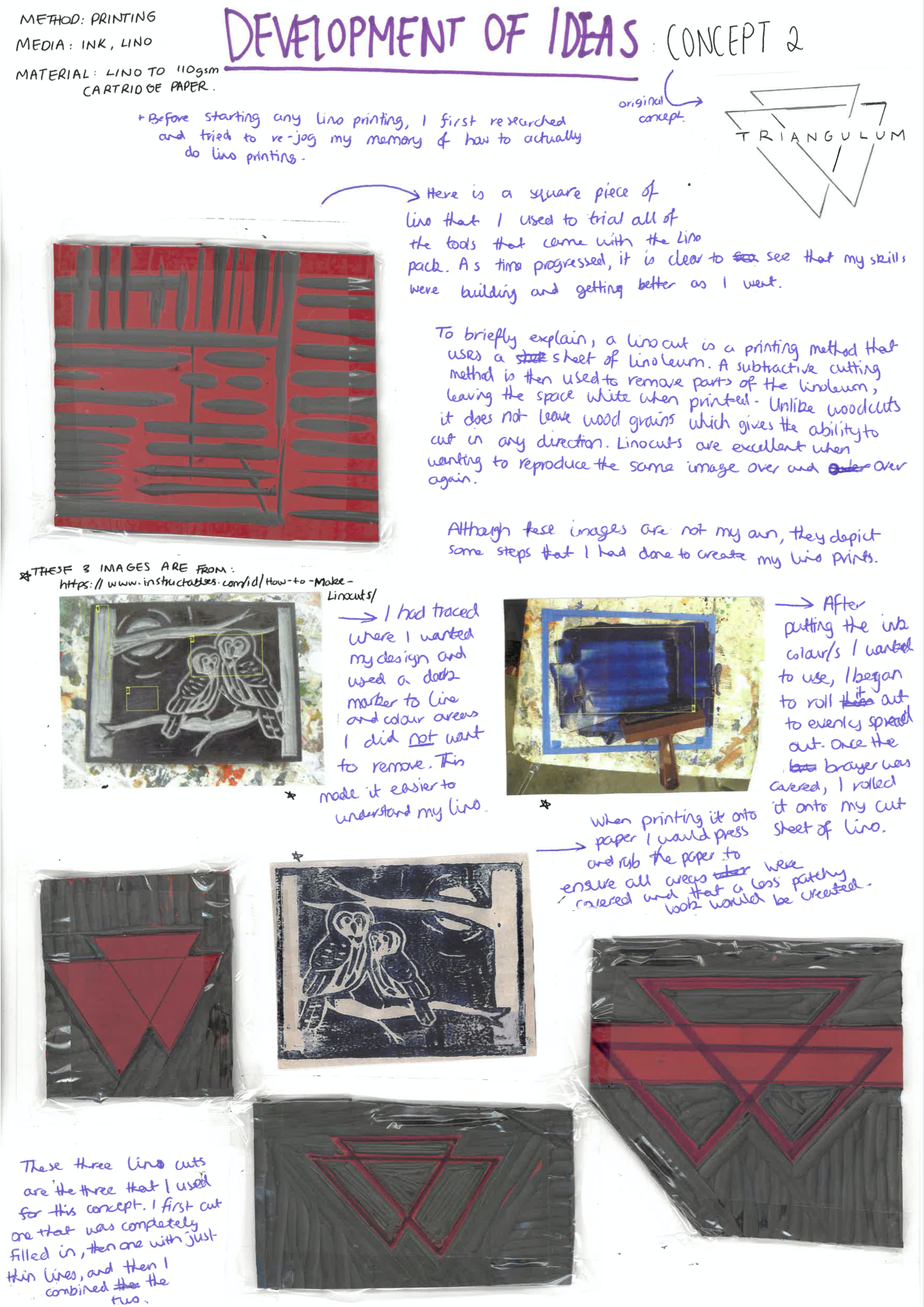
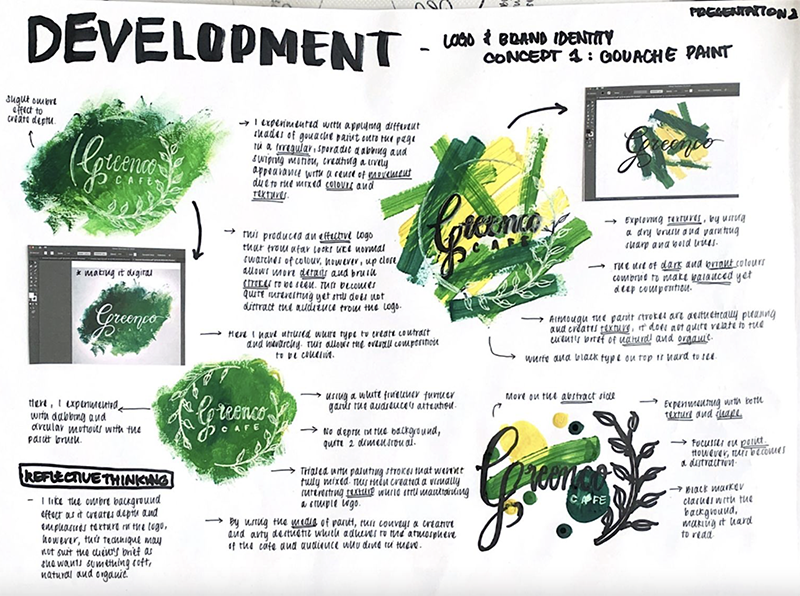
Exploring different methods and media used in drawings will lead to myriad results. However, whilst it is sometimes natural to fight against the roughness of a chalk pastel when trying to colour in a logo neatly, consider just going with it. What great textures it brings! Then, for example, move to lino-cut printing, scraperboard, screen-printing and mono-printing. Other ideas include borrowing conventions from other fields of design: Research designs that are dissimilar to the ones students are designing. For example, they could look at signs, vintage posters or chemical labels. Apply these styles to their designs to create original effects. Developing ideas with manual methods and media provide intuitive opportunities. The trick here is for students to try to let go of their fears and roll with the effects of using new media. Kinds of media students can try are;
- Dry media: Pencils, pastels, Conte sticks
- Wet media: Paint; opaque acrylic, gouache, watercolour, inks
- Printmaking: Lino cut, mono-printing, etching,
- Collage, rubbings
Encourage students to take a dig around their school art room and see what they can find.
Exploring different methods for designs in the fields of objects and environments also helps develop ideas. The range of art skills shown above, used predominantly for designs in the field of messages may not suit the development of a chair, for example. For three-dimensional designs, students need to use different technical and pictorial drawing methods. They are encouraged to develop ideas by beginning to use;
- 3rd Angle Orthogonal
- Plans and elevations
- Freehand sketching
- Perspective: One and Two-Point Perspective
- Paraline: Isometric and Planometric drawing
DEVELOPMENT Using Design Manual and digital methods and media
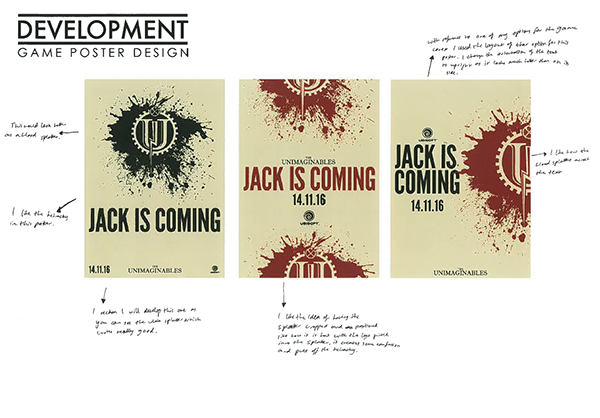
Students can use vector and raster-based media to develop concepts digitally. They may also use hybrid processes where manual components of their designs are scanned and used in digital compositions. Development work with digital applications may involve the development of Design Elements and Principles simultaneously.
The development of ideas in the fields of objects and environments is done in both two and three dimensions. Vector-based or CAD applications can be used to make technical drawings and conventions can be introduced at progressively. CAD programs such as Tinkercad and Fusion 360, for example, can be used to model three-dimensional forms. 3D printing can be used to create real forms.
Industrial designers use Low-fi prototyping with cheap, readily available and easy-to-use materials to develop ideas; testing and proving theories about form, function and usability quickly on the go.
Interactive Experience designers use digital processes to develop their ideas. Methods such as creating wireframes to develop layouts, drawing storyboards to develop progress through an interactive experience and prototyping applications to develop interactivity and relationships between sections of an app design.
Design ideas in the fields of environments and object design can be developed with using digital media. Students may develop ideas in the virtual space using CAD applications where they develop both the form and the surface. They can also rapid digital prototype by 3D printing or laser cutting forms.
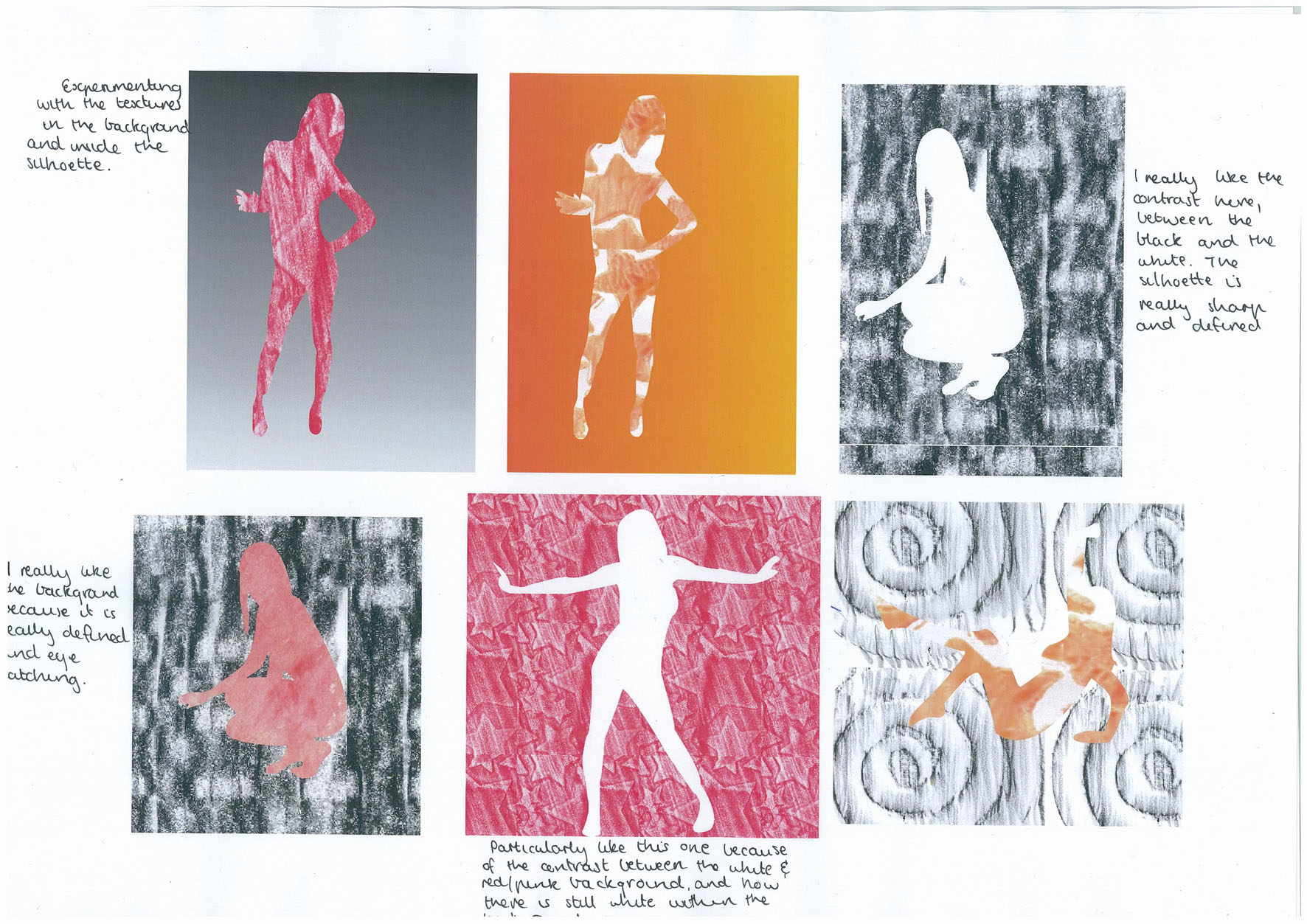
Intentional Ways to EXOPLORE Methods, Media and Materials
Materials
TWO-DIMENSIONAL IDEAS
THREE-DIMENSIONAL IDEAS
Actual materials
- Draw, paint and print your designs on different kinds of paper, board, and woods
- Make your models (or parts of them) from different materials
Represented materials
- Use different material textures in 3D renderings.
- Add materials in masks to type
- Add materials as backgrounds in two-dimensional presentations
- Redesign components using geometric or organic shapes
METHODS AND MEDIA
TWO-DIMENSIONAL IDEAS
THREE-DIMENSIONAL IDEAS
Manual methods
- Make your design using drawing, painting, collage, photography and print-making
- Build your model using fabrication, carving and moulding
Digital media and methods
- Make your design using vector and raster-based applications
- Use a free CAD program such as Tinkercad to model forms
- Export your file and 3D print your work
Technical drawing methods
- Make your designs using all two and three-dimensional technical drawing methods
- Use a method you think might not be suitable
- Represent your form with the appropriate two and three-dimensional technical drawing methods
Combined manual and digital methods and media
- Use any of the manual methods shown above to create images, scan them then combine them in vector or raster-based applications
- Combine 3D printed or found objects in your hand made design model
MEDIA
TWO-DIMENSIONAL IDEAS
THREE-DIMENSIONAL IDEAS
Dry media
- Make each of your designs using pencils, colour pencils, pastels and chalks
- Make your model from cut and joined or folded materials
Wet media
- Make each of your designs using ink, paint, printing inks
- Make your model using a mould making technique
Digital media
- Make your designs or components of them, using vector and raster-based applications
- Make technical drawing and 3d forms using vector-based applications and CAD programs such as Tinkercad and Fusion 360
task
Show I know ...
Note: Development of Methods, Media and Materials may require students to make new drawings for each experiment. Alternatively, students can use one drawing to demonstrate the use of several methods, media or materials simultaneously.
4.1 SUSTAINED EXPERIMENTATION – MANUAL METHODS
Undertake a process of sustained experimentation and exploration to develop ideas. Make sure you have tested out a range of two and three-dimensional manual methods.
4.2 SUSTAINED EXPERIMENTATION – DIGITAL PROCESSES
Undertake a process of sustained experimentation to develop ideas. Make sure you have tested out a range of two and three-dimensional digital methods.
4.3 Check them off
Ensure that you have demonstrated the development of your ideas using a broad range of methods, media and materials. Ensure that you have used both manual and digital processes in your folio work. (Refer to the table above for ideas) Annotate your examples using the advice shown below.
.
Jump to
Present ideas and gain fresh perspectives
Professional designers frequently work in teams that support, give positive critical feedback and provide inspiration for each other. Students in VCE VCD are required to work collaboratively in the Develop stage of the Design Process. Working with others is a key way to enlarge and elaborate on design ideas in an authentic and meaningful way. Students use the Design Critique to present ideas and receive feedback. Students in Year 12 doing the School Assessed Task also use the Pitch, a more formal kind of Design Critique as part of their assessment.
Collaboration for fresh perspectives
After developing their ideas by exploring the Design Elements and Principles and manual and digital methods and media students are ready to show their ideas to others. In this stage, they use the ‘Design Critique’ as a forum to present, listen and hear the perspectives of others. Students then process and action feedback to improve their ideas and bring them closer to satisfying the target audience or user’s needs. Showing and explaining by answering others’ questions is a fantastic way to embed knowledge and understanding and is guaranteed to create an opportunity for students to reflect on their ideas and pinpoint strengths and weaknesses as they are presented to others.
A full outline of the process for conducting and participating in a Design Critique is shown on here. Please head over to understand this stage.
task
Show I know ...
5.1 Design Critique
Jump to
Documenting the design journey
Using the Design Process in Visual Communication Design takes students on a complex, winding path from Discovery to Delivery. It is a journey filled with dead ends, successes, failures, challenges and opportunities for deep and sustained, independent student learning. Whilst some design journeys are quick, lasting several days the School Assessed Task in Year 12, will take students the greater part of a school year to complete. How then do we record this journey and the learning gained along the way?
Metacognitive thinking
Much of a student’s writing in their folio is about their own design work. They describe their design journey in a type of commentary, with small pieces of text known as ‘annotations’. In this writing, students adopt something similar to an alter ego, a second or alternative personality, like that of a trusted friend as they see and reflect on their work. Thinking about one’s own thinking, including the design decisions one makes is called ‘metacognitive thinking’.
There is a range of ways to annotate one’s design journey appropriately, for each stage of the Design Process. The purpose and requirements of annotations change as do the kinds of thinking used in the Discover, Define, Develop and Deliver phases.
Generally, annotations are structured around terms known as action verbs. These include identifying and describing characteristics of images, discussing and explaining design decisions made in developing and resolving design ideas and design solutions, linking, connecting and comparing ideas with research and other insights, evaluating ideas and reflecting on learnings and understandings gained throughout the Design Process.
Jump to
 (opens in a new tab)
Design Critique, Collaboration & Annotations
task